Daedalus - Tool Creator
The meta-agent that builds custom tools and complex workflows that any agent can use
Build Any Tool: From simple API integrations to complex multi-system workflows - Daedalus creates production-ready tools through conversation.
Who is Daedalus?
The technical specialist that builds custom tools and workflows through conversation. Unlike using existing tools, Daedalus creates specialized capabilities that any agent can use to solve complex technical challenges.
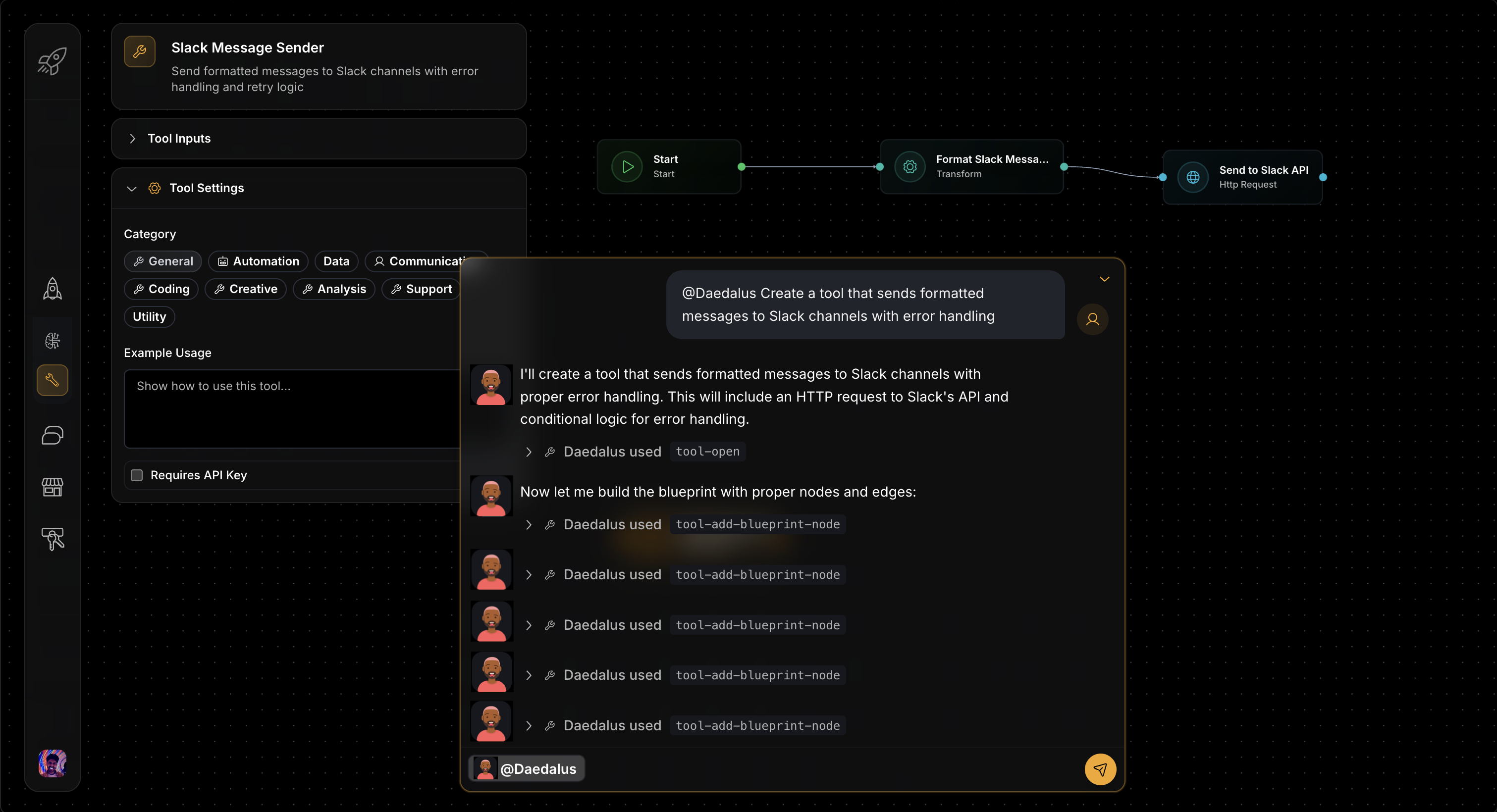
Create tools with parameters and blueprints, or deploy from templates
Getting Started: Your First Tool
Describe Your Need
Tell Daedalus: "Create a tool that sends formatted Slack notifications with error handling"
Be Detailed: Include functionality, format, and reliability requirements upfront
Technical Planning
Daedalus asks about requirements and integration details while designing the workflow.
Share Context: Mention authentication methods, rate limits, and integration needs
Build and Test
Daedalus creates the tool with validation, testing, and documentation ready for agents.
Set Success Criteria: Define "working" - delivery confirmation, success rate, response time
Deploy and Assign
Your tool becomes available for assignment to agents with your specific requirements.
Start Simple: Deploy basic functionality first, then add features based on usage
Technical Expertise Included: Daedalus handles complex workflow design, error handling, and optimization automatically.
What Makes Daedalus Special
Daedalus is a meta-agent builder - an AI that creates the technical building blocks other agents use. Daedalus understands:
- Blueprint Architecture: How to design efficient multi-step workflows
- Tool Engineering: Creating reliable, reusable capabilities with proper error handling
- Integration Patterns: Connecting systems and APIs effectively
- Performance Optimization: Building fast, scalable solutions
How Daedalus Creates Tools
Requirement Analysis and Design
Technical Specification Gathering:
You: "Create a tool that validates email addresses and checks domain reputation"

Daedalus: "I'll build an email validation tool. Let me confirm requirements:
- Input: Email address string
- Validation: Syntax, domain existence, reputation score
- Output: Valid/invalid status with details
- Integration: Should this connect to any specific email services?"
Architecture Planning:
Daedalus designs:
1. Input validation node
2. Syntax check logic
3. Domain DNS lookup
4. Reputation API call
5. Result aggregation
6. Error handling paths
How Daedalus Works Behind the Scenes
Daedalus uses specialized capabilities to design and build tools:
Tool Development: Creates tool scaffolds, modifies blueprints, validates functionality, and manages the complete tool development lifecycle.
Blueprint Construction: Designs efficient workflow architectures with proper error handling, optimal performance, and maintainable structure.
Quality Assurance: Validates workflows, implements security best practices, and ensures tools work reliably across different scenarios.
The Daedalus Tool Creation Workflow
Every tool creation follows this proven workflow pattern:
How Each Step Works
- Analyze Requirements: Daedalus processes your request and identifies the tool's purpose, input/output specifications, and technical constraints
- Design Architecture: Plans the blueprint workflow, determines node types needed, and maps data flow patterns
- Create Scaffold: Builds the basic tool structure with parameter definitions and initial blueprint nodes
- Build Logic: Implements the core workflow with proper error handling, validation, and business logic
- Configure Parameters: Sets up input validation, output formatting, and environment variable requirements
- Test & Optimize: Validates functionality, optimizes performance, and ensures reliability before deployment
Production-Ready Tools: Daedalus builds tools with comprehensive error handling, security, and performance optimization built-in.
Daedalus Creation Examples
Slack Notification Tool
Your Request:
"Create a tool that sends formatted messages to Slack channels with error handling"
Daedalus's Process:
- Requirements Analysis: Clarifies message formats, channels, authentication methods
- Workflow Design: Creates validate → format → authenticate → send → handle-response flow
- Error Handling: Implements retry logic, rate limiting, and fallback strategies
- Testing: Validates with different message types and error scenarios
Result: Production-ready Slack tool with comprehensive error handling and formatting options
CSV Database Import
Your Request:
"Build a tool that processes CSV files and imports data to our database safely"
Daedalus's Process:
- Data Flow Design: Creates upload → parse → validate → transform → insert → report workflow
- Validation Logic: Implements data type checking, constraint validation, and business rules
- Performance Optimization: Adds batch processing, streaming, and memory management
- Transaction Safety: Ensures atomic operations with rollback capabilities
Result: Robust data import tool handling large files and complex validation requirements
Uptime Monitor
Your Request:
"Create a monitoring tool that checks website uptime and sends intelligent alerts"
Daedalus's Process:
- Monitoring Architecture: Designs scheduled checks with response analysis and alerting
- Health Logic: Implements status determination based on response codes, timing, and content
- Alert Management: Creates escalation rules, recovery notifications, and multi-channel alerts
- Historical Tracking: Adds trend analysis and performance degradation detection
Result: Comprehensive monitoring system with intelligent alerting and historical insights
Order Processing Workflow
Your Request:
"Build a tool that handles complex order processing with multiple system integrations"
Daedalus's Process:
- System Integration: Maps connections to inventory, payment, CRM, and shipping systems
- Business Rules: Implements validation, pricing logic, and approval workflows
- Compensation Logic: Creates rollback strategies for partial failures
- Orchestration: Designs parallel processing and status tracking
Result: Enterprise-grade order processing tool with comprehensive error recovery