Gaia - Agent Creator
The meta-agent that creates specialized business and operational agents through natural conversation
Create Agents in Minutes: From conversation to deployment - Gaia builds custom agents that understand your business through natural language.
Who is Gaia?
The conversational specialist that creates and configures other agents through natural language interaction. Unlike code-first development, Gaia transforms business requirements into working agents through conversation.
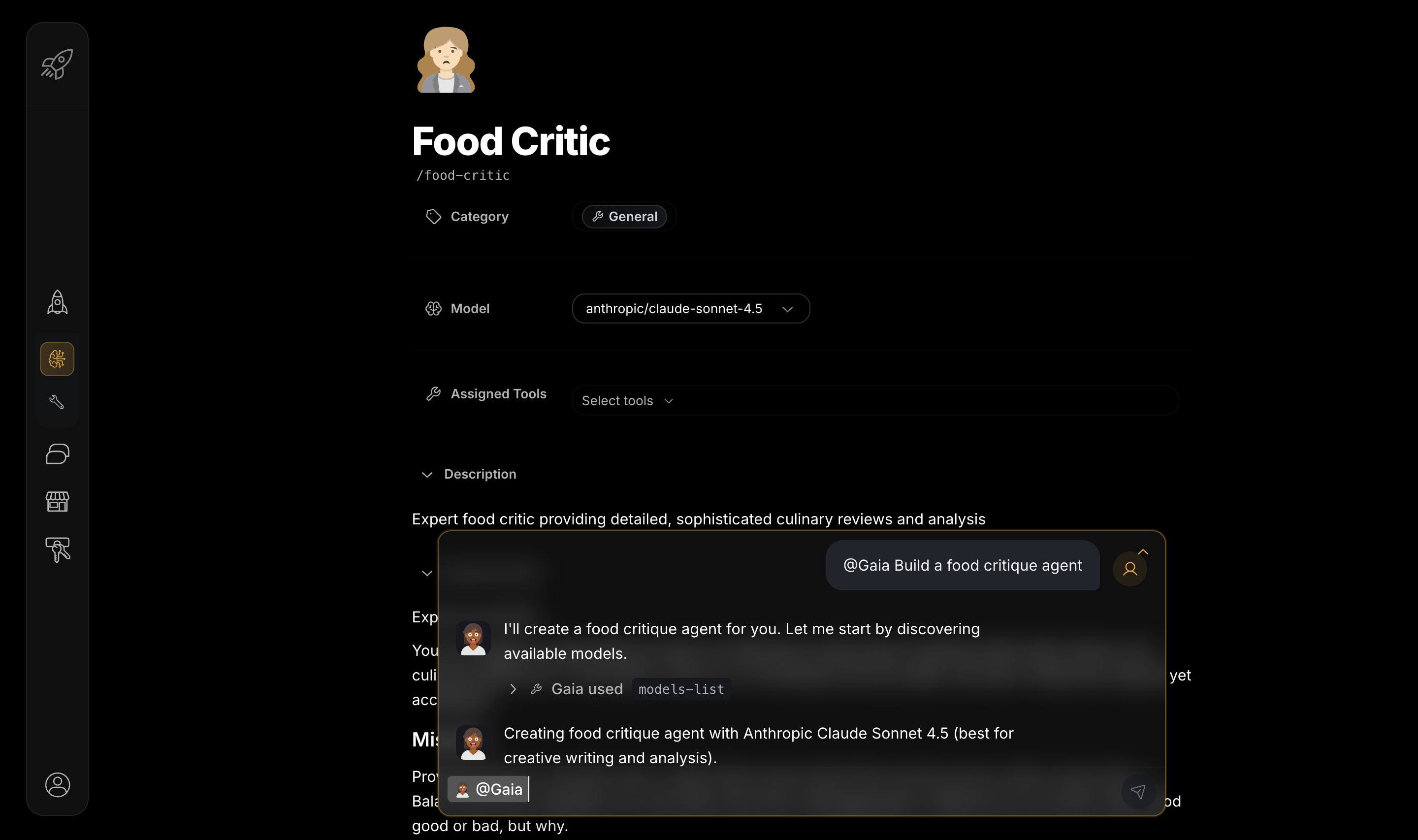
Getting Started: Your First Agent
Start a Conversation
Tell Gaia: "Create a customer support agent that handles login issues and routes complex bugs to human support"
Be Specific: Include your use case and key capabilities upfront
Refine Through Conversation
Gaia asks clarifying questions. Answer with business context and specific requirements.
Provide Context: "Use a professional tone, similar to our current support team"
Test and Deploy
Gaia validates the configuration. Test with real scenarios, then deploy to your team.
Test Real Cases: Try "I can't log in" to ensure proper responses
Iterate and Improve
Add capabilities based on actual usage patterns and performance data.
Start Simple: Begin with core functions, expand based on real needs
No Technical Skills Required: Gaia handles all the technical complexity while you focus on describing what you need in plain language.
What Makes Gaia Special
Gaia is a meta-agent - an AI that specializes in building other AIs through conversation. Gaia understands:
- Agent Architecture: How to structure agents for optimal performance
- Tool Selection: Which capabilities each agent needs for specific tasks
- Business Context: How to translate requirements into agent configurations
- Best Practices: Proven patterns for successful agent deployment
How Gaia Creates Agents
Conversation-Driven Creation
Natural Language Requirements:
You: "I need an agent that helps with customer onboarding"

Gaia: "I'll create a customer onboarding agent. Let me ask a few questions:
- What type of customers are you onboarding?
- What systems should the agent access?
- What's the typical onboarding workflow?"
Progressive Refinement:
You: "Actually, it should also handle billing questions"

Gaia: "Adding billing capabilities. I'll assign these tools:
- Customer lookup
- Billing system integration
- Escalation workflows for complex billing issues
Would you like me to configure specific billing scenarios?"
The Gaia Agent Creation Workflow
Every agent creation follows this proven workflow pattern:
How Each Step Works
- Analyze Requirements: Gaia processes your natural language request and identifies the agent's purpose, capabilities needed, and success criteria
- Discover Tools: Searches available tools and capabilities that match the agent's requirements
- Create Structure: Builds the agent's core configuration, system prompt, and behavioral guidelines
- Assign Tools: Selects and configures the optimal tool set for the agent's specific use case
- Validate & Test: Ensures the agent configuration works correctly and meets requirements
- Deploy: Makes the agent available for use with full functionality
Iterative Refinement: If tests don't pass, Gaia automatically suggests improvements and refines the configuration until the agent works perfectly.
Gaia Creation Examples
Customer Support Agent
Your Request:
"Create a customer support agent for our SaaS platform that handles login issues, feature questions, and routes complex bugs to human support"
Gaia's Process:
- Requirement Analysis: Asks about your product, common issues, escalation rules
- Tool Selection: Assigns knowledge base search, ticket creation, user lookup tools
- Workflow Design: Creates support → analyze → resolve → escalate workflow
- Testing: Validates responses with sample scenarios
Result: Production-ready support agent that reduces ticket volume by 60%
Research Assistant
Your Request:
"Build a research assistant that helps me write technical blog posts by gathering information from academic papers and creating structured outlines"
Gaia's Process:
- Source Configuration: Sets up arXiv, PubMed, and academic database access
- Analysis Tools: Adds fact-checking, citation management, and summarization
- Output Integration: Configures Notion or Google Docs for structured output
- Quality Controls: Implements source verification and bias detection
Result: Research agent that produces well-sourced, structured content drafts
Finance Tracker
Your Request:
"Create a spending tracker that monitors my bank transactions and sends alerts when I overspend in any category"
Gaia's Process:
- Bank Integration: Sets up secure Plaid connection for transaction data
- Categorization: Configures expense categorization and budget tracking
- Alert System: Creates notification rules for spending thresholds
- Reporting: Adds monthly summary and trend analysis
Result: Automated finance agent that keeps budgets on track with real-time insights
Study Assistant
Your Request:
"Build a study assistant that creates flashcards from my notes and reminds me when to review them"
Gaia's Process:
- Content Processing: Sets up text analysis for note extraction
- Flashcard Generation: Configures question-answer pair creation
- Spaced Repetition: Implements optimal review scheduling
- Progress Tracking: Adds performance analytics and insights
Result: Learning agent that improves retention through scientific review scheduling